
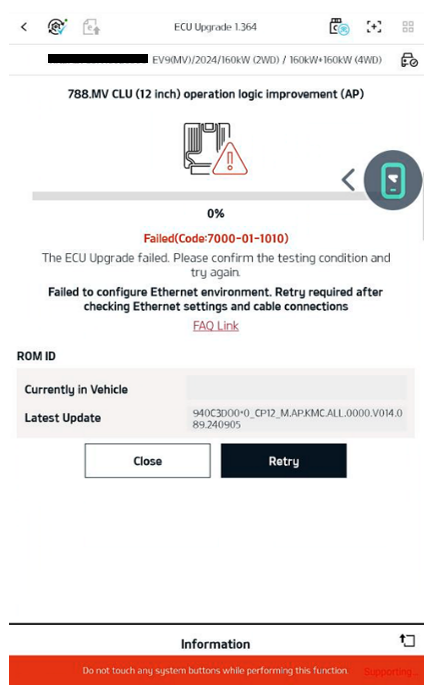
Error 7000-01-1010 is caused by a network or physical connection issue or incomplete configuration. Check the static IP settings, disable LTE/5G, inspect the cables, update the Google Play system, replace the VCI device, verify the vehicle power status, and restart the tablet in the order listed. VCI3 operates without an ECI connector but supports wired connections only. If the issue persists, contact the vehicle or control unit manufacturer.
Example Error Screen
Error 7000-01-1010 Inspection Checklist
-
Check whether the VCI module LED is flashing green.
When reprogramming starts and the Ethernet connection is attempted, verify that the LED on the ECI connected to the VCI flashes green. - Verify that reprogramming was attempted while the vehicle was in the IG On state.
-
Verify that the static IP configuration has been completed. A valid static IP address is required for the network connection.
🔗 How to Configure a Static IP Address -
Verify that LTE/5G is disabled. (If the tablet does not support mobile data, this item is “Not applicable.”)
※ If LTE/5G is enabled, it may interfere with the wired Ethernet connection. Turn off LTE/5G and try again using Wi-Fi or a wired connection. -
Check the wired cable connections and inspect the cables for open circuits or damage.
• When using VCI3: Verify the USB cable connection
• When using VCI2: Verify the ECI cable connection
A physical connection failure may be the primary cause. Inspect the condition of all connectors and cables.
If a spare ECI is available, replace the ECI and try again. -
Verify that the Google Play system update is current. (Settings > Security and updates)
🔗 How to Update the Google Play System - Restart the tablet, and then verify whether the same symptom occurs again.
- Disconnect the vehicle battery to reset the power. Wait at least 15 minutes, try again, and verify whether the same symptom occurs.
- Replace the cable with another wired cable, and then verify whether the same symptom occurs.
- Use another tablet, and then verify whether the same symptom occurs.
Q1. What causes error 7000-01-1010?
A1. The error is caused by a network or physical connection issue or incomplete configuration. Check the following items in order.
- Static IP address not configured → Configure the correct static IP address. Refer to the link above.
- LTE/5G enabled → Disable it, and then try again using a wired connection or Wi-Fi.
- Cable open, defective, or disconnected → Check the cable connection and inspect for an open circuit. Test with another cable.
- Google Play system update not applied → Update to the latest version. Refer to the link above.
- Possible VCI device fault → Test with a spare VCI2/VCI3.
- Vehicle/power status → Set the vehicle to IG On, reset the battery power, and try again.
- Tablet issue → Restart the tablet or test with another tablet.
Q2. Is an ECI connector required when using VCI3?
A2. No. VCI III operates normally without an ECI connector. (Wired connections only)
Q3. What should I do if the error is not resolved after trying all the procedures?
A3. If the issue persists after completing every item in the checklist above, contact the vehicle or control unit manufacturer.
Comments
0 comments
Please sign in to leave a comment.